
Nota Arp
Nota Arp is a step arpeggiator. It takes the notes you hold down and plays them back as a rhythmic pattern — up, down, as a chord, and more — with per-step control over velocity, length, chance, ratchets and transposition.
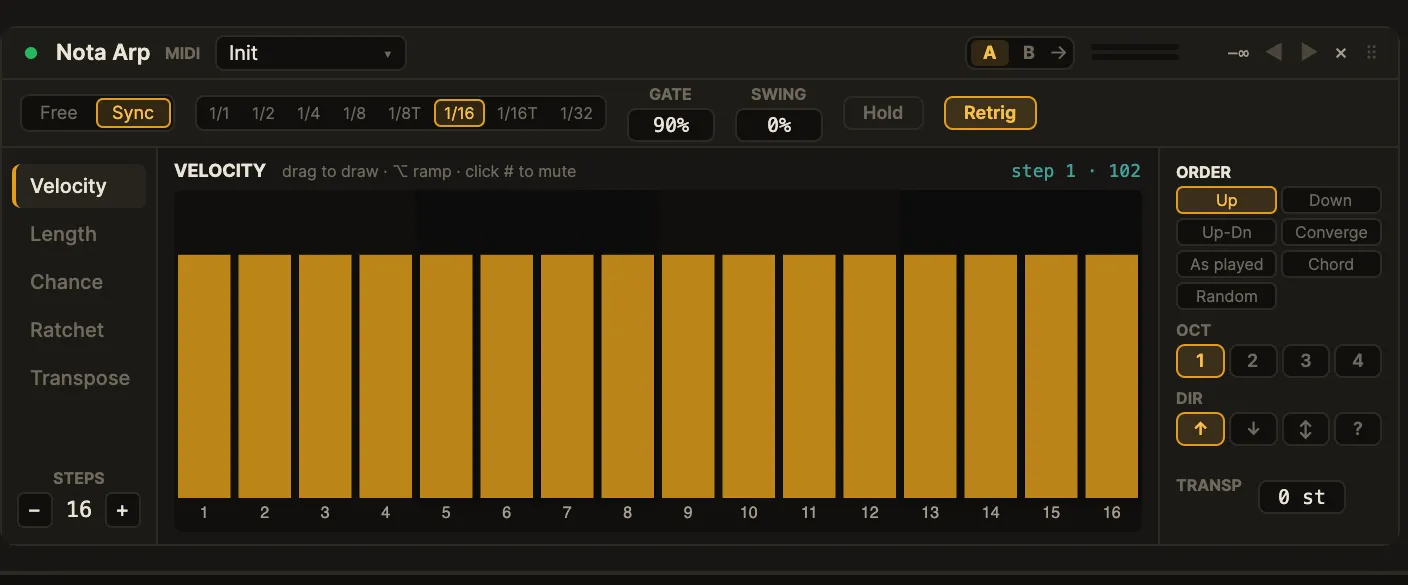
Overview
Section titled “Overview”Nota Arp sits before an instrument. It consumes the held chord and emits a generated sequence:
held notes ─▶ note order · octaves ─▶ per-step (velocity · length · chance · ratchet · transpose) ─▶ MIDI outThe pattern is locked to the transport, so it stays in time through loops and seeks and renders identically on export.
Interface
Section titled “Interface”The card (mockup 2k) has a live strip over a lane rail, the step grid and an order rail.
- Live strip — clock source (Free / Sync), the note rate (
1/1through1/32, including the triplets1/8Tand1/16T),GATE(note length),SWING, and the Hold and Retrig toggles. - Lane rail (left) — pick which per-step lane the grid edits: Velocity ·
Length · Chance · Ratchet · Transpose.
STEPSsets the pattern length (1–16). - Step grid (centre) — the 16 steps of the selected lane. Drag to draw,
hold ⌥ to draw a ramp, and click a step number to mute it. A playhead and a
live
step · valuereadout track playback. - Order rail (right) —
ORDER(Up · Down · Up-Dn · Converge · As played · Chord · Random),OCT(octave range 1–4),DIR(octave direction:↑up,↓down,↕up-down,?random) andTRANSP.
Parameters
Section titled “Parameters”Global:
| Parameter | Range | What it does |
|---|---|---|
Sync / Free |
— | Lock the rate to the transport, or run at a free rate. |
Rate |
1/1…1/32 |
Step length when synced (includes 1/8T, 1/16T triplets). |
Gate |
0…200 % |
Length of each note as a fraction of the step. |
Swing |
0…100 % |
Delays every other step for a shuffle feel. |
Hold |
on / off | Keep arpeggiating after you release the keys. |
Retrig |
on / off | Restart the pattern from step 1 on each new chord. |
Steps |
1–16 |
Pattern length (the loop length in steps). |
Order |
Up … Random | The order the held notes are played in. |
Oct |
1–4 |
How many octaves the pattern spans. |
Dir |
↑ ↓ ↕ ? |
Direction the octaves move through. |
Transp |
-24…+24 st |
Transpose the whole output. |
Per-step lanes (16 steps each, chosen from the lane rail):
| Lane | Range | What it does |
|---|---|---|
Velocity |
0–1 |
Loudness of the note on that step. |
Length |
0–2 |
Note length multiplier for that step. |
Chance |
0–1 |
Probability the step plays at all. |
Ratchet |
1–8 |
How many rapid re-hits the step fires. |
Transpose |
-24…+24 st |
Per-step pitch offset. |
| (mute) | on / off | Click a step’s number to silence just that step. |
Tips & recipes
Section titled “Tips & recipes”- Classic up-arp: hold a chord,
Order= Up,Rate=1/16— instant arpeggio. Turn on Hold to keep it going hands-free. - Rolling accents: raise a few steps on the
Velocitylane and drop others for a groove; add Swing for shuffle. - Bursts: set a step’s
Ratchetto3–4for a quick repeated hit. - Evolving pattern: pull some
Chancevalues below 100 % so the sequence varies each pass.
See also
Section titled “See also”- Nota Chord — build chords to feed the arp.
- Nota Scale — keep the arpeggio in key.