
Nota Sampler
Nota Sampler plays a single audio sample across the keyboard. Drop in a sound, set the start/end and loop, and shape it with pitch, an amp envelope and a filter — the built-in way to turn any recording into a playable instrument.
Overview
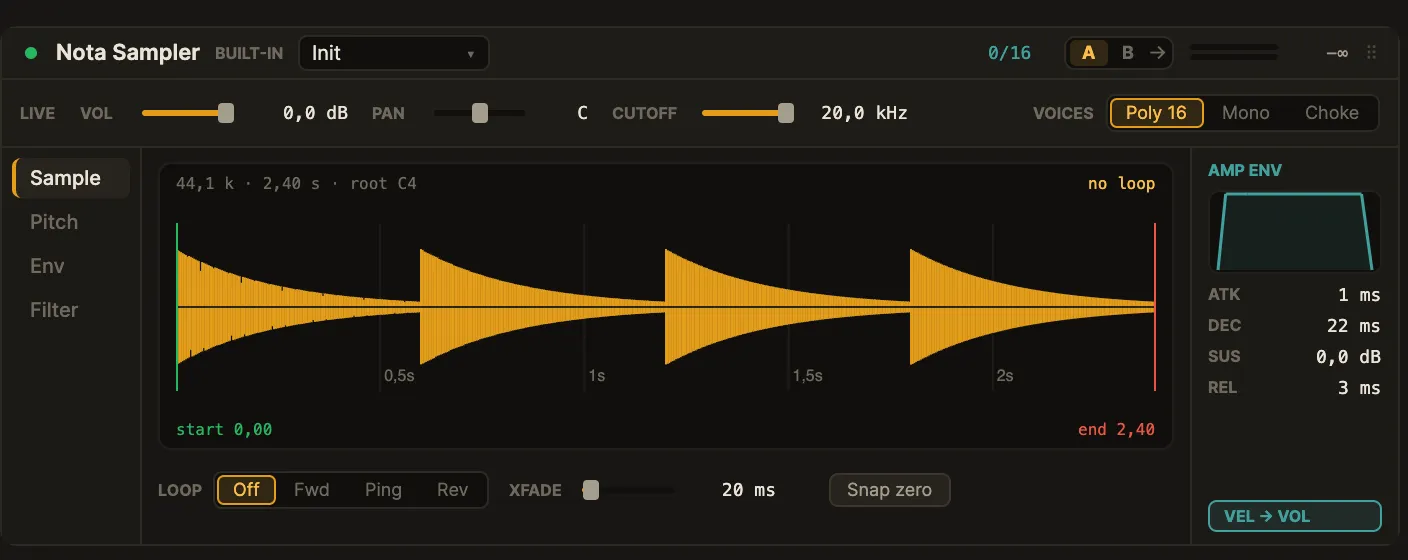
Section titled “Overview”Load a sample by dragging it from the browser or Finder onto the track (an empty Sampler shows a “drop a sample here” prompt). Each note plays the sample, pitched from the root you set. Trim the playback window, add a loop for sustained notes, and shape the tone with the envelope and filter.
This is the single-sample engine — one sample per Sampler (multisample zone mapping is out of scope).
Interface
Section titled “Interface”The card (mockup 2o) is a live strip over a tab rail.
- Live strip —
VOL,PANandCUTOFFplus theVOICESmode (Poly 16 · Mono · Choke), reachable from any tab. - Tab rail (left) — Sample · Pitch · Env · Filter.
The tabs:
- Sample — the waveform with draggable start / end and loop handles, the
LOOPmode (Off · Fwd · Ping · Rev), a loopXFADE, and Snap zero (snaps markers to zero-crossings); an amp-envelope rail sits on the right. - Pitch — Transpose and Detune, the root note, and a mini keyboard.
- Env — the amplitude A/D/S/R with Vel → Vol.
- Filter — type (Off · LP · HP · BP) with Cutoff · Reso · Key Track.
Parameters
Section titled “Parameters”| Parameter | Range | What it does |
|---|---|---|
Volume / Pan |
— | Output level and pan. |
Voices |
Poly 16 · Mono · Choke | Voice mode. |
Start / End |
0–1 |
Playback window in the sample. |
Loop |
Off · Fwd · Ping · Rev | Loop mode (forward, ping-pong or reverse). |
Loop Start / Loop End |
0–1 |
Loop points within the window. |
Loop Xfade |
0…200 ms |
Crossfade at the loop seam. |
Root |
note | The note at which the sample plays back at its original pitch. |
Transpose |
±24 st |
Coarse pitch shift. |
Detune |
±50 c |
Fine pitch shift. |
Attack Decay Sustain Release |
ADSR | Amplitude envelope. |
Vel → Vol |
on / off | Velocity controls level. |
Filter Type |
Off · LP · HP · BP | Filter shape. |
Cutoff / Reso |
— | Filter frequency and resonance. |
Key Track |
0–1 |
How much cutoff follows the keyboard. |
Tips & recipes
Section titled “Tips & recipes”- Sustained pad from a one-shot: set Loop to
Fwd, place the loop points in a steady part of the sample, and add a littleXfadeto hide the seam. - Clean edits: use Snap zero so start/end/loop markers sit on zero-crossings and don’t click.
- Reverse hit: switch Loop to
Rev(or reverse the whole sample) for swells and risers. - Tune it: set the root to the sample’s actual pitch so it plays in tune across the keyboard.
See also
Section titled “See also”- Nota Grain — granular playback of a sample.
- Nota Aurora — wavetable synthesis.