
Nota Grain
Nota Grain is a granular synthesizer. It scans a loaded sample with a cloud of short overlapping grains — freeze on a spot for shimmering textures, scan slowly for evolving drones, or let the keyboard drive the read position. It ships with a procedural default sample, so it makes sound before you drop in your own.
Overview
Section titled “Overview”sample ─▶ [Position / Scan] ─▶ grain cloud (Size · Density · Spray · Pitch · Spread) ─▶ filter ─▶ amp ─▶ outA read position moves through the sample. Grains of a chosen size spawn at a density (overlap), each sprayed randomly around the position, pitched by the note and spread across the stereo field. The cloud then runs into a filter and an amp envelope.
Drop a sample from the browser (or Finder) onto the track to replace the default.
Interface
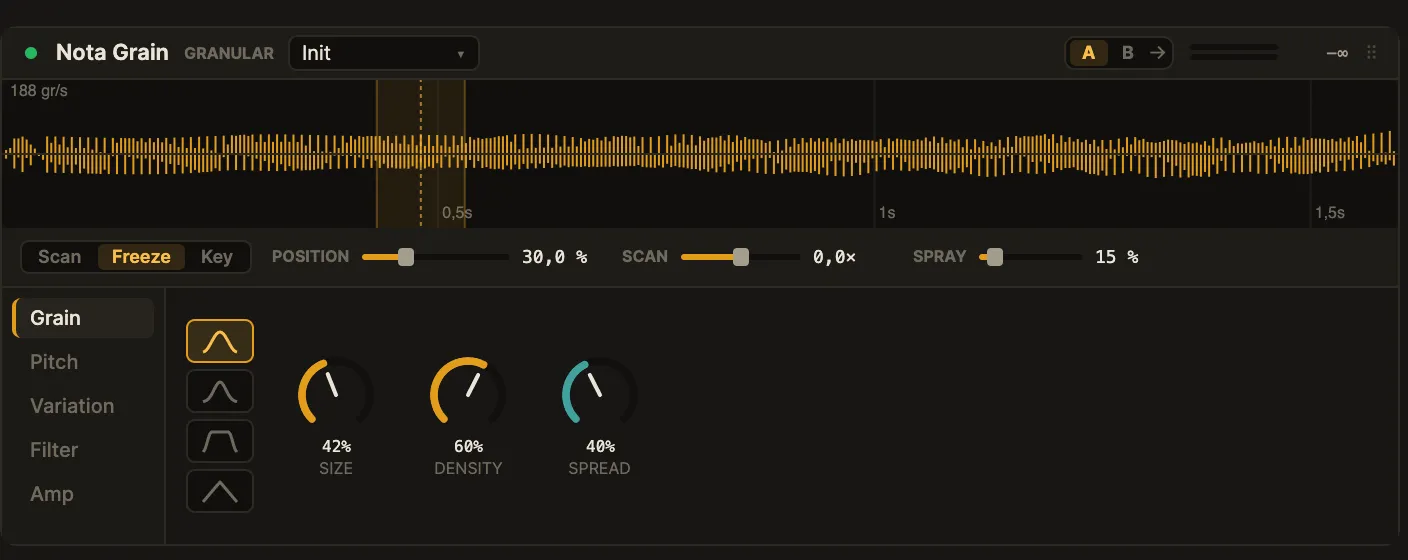
Section titled “Interface”The card (mockup 2d) stacks a waveform, a scan strip and a tab rail.
- Waveform — the sample with the current grain window highlighted and live playheads for the sounding grains; a grains-per-second readout sits top-left.
- Scan strip — the scan mode (Scan · Freeze · Key) and the
POSITION,SCAN(speed) andSPRAYsliders, reachable from any tab. - Tab rail (left) — Grain · Pitch · Variation · Filter · Amp.
The tabs:
- Grain — the grain shape (four window shapes) and Size · Density · Spread.
- Pitch — Coarse and Fine tuning.
- Variation — per-grain Pos · Pitch · Pan randomisation.
- Filter — type (LP · HP · BP) with Freq · Reso.
- Amp — the A/D/S/R amplitude envelope.
Parameters
Section titled “Parameters”| Parameter | Range | What it does |
|---|---|---|
Scan mode |
Scan · Freeze · Key | How the read position moves: at a speed, frozen, or following the keyboard. |
Position |
0–100 % |
Where in the sample grains are read from. |
Scan |
-4×…+4× |
Read speed (and direction) when scanning. |
Spray |
0–100 % |
Random spread of grain start points around the position. |
Grain shape |
4 shapes | The grain window shape. |
Size |
short…long | Grain length. |
Density |
1–8× |
Grain overlap. |
Spread |
0–1 |
Stereo width of the grain cloud. |
Coarse / Fine |
— | Pitch of the grains in semitones and cents. |
Pos Rnd / Pitch Rnd / Pan Rnd |
0–1 |
Per-grain position, pitch and pan randomisation. |
Filter |
LP · HP · BP · Freq · Reso | Subtractive filter after the cloud. |
Attack Decay Sustain Release |
ADSR | Amplitude envelope. |
Volume / Pan |
— | Output level and pan. |
Tips & recipes
Section titled “Tips & recipes”- Frozen pad: set the scan mode to Freeze, raise
SizeandDensity, and add a littleSprayandSpreadfor a lush, static cloud. - Evolving texture: switch to Scan with a slow
Scanspeed so the read point drifts through the sample. - Playable sampler feel: use Key mode so the read position tracks the notes you play.
- Grit and shimmer: nudge
Pitch Rndup for detuned, chorused grains.
See also
Section titled “See also”- Nota Aurora — wavetable synthesis.
- Nota Volt — analog-style subtractive synthesis.